Performance and careers · Premium plan
Performance evaluation software. Develop your talent.
Bring self-assessment, manager reviews and 360° feedback together in a performance management platform. Configure cycles around goals and competencies, and track development plans throughout the year.
Performance evaluation
Goal reviews,
competencies and 360° feedback.
Combine goals and competencies in the same review cycle. Bring together self-assessment and the manager’s perspective, and include peer competency ratings in 360° cycles. Set the weights to match your organisation’s model.
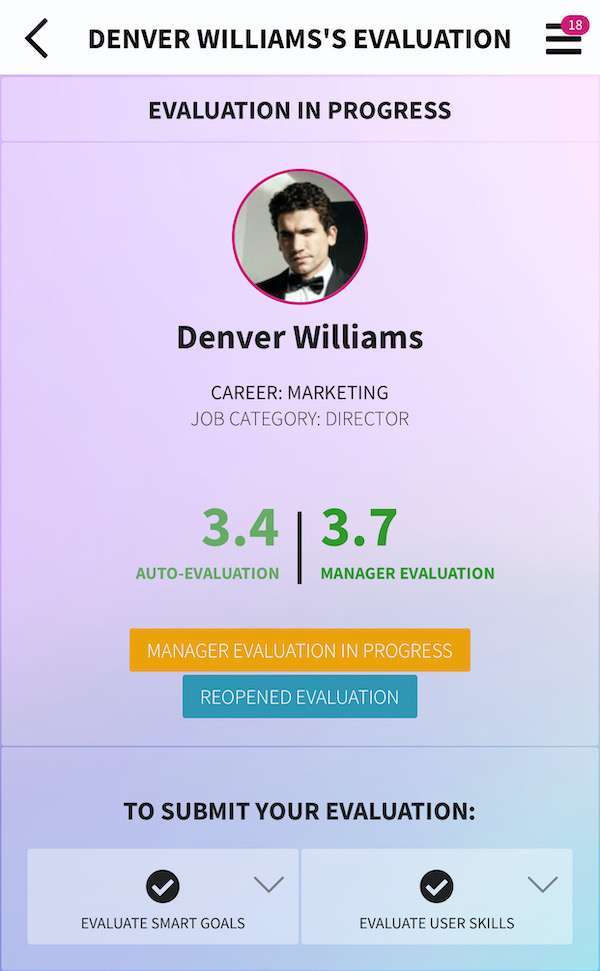
Review example: results, goals and competencies in one view.
Self-assessment.
Employees reflect on their own performance and competencies. This perspective gives context to the conversation with their manager and helps them discuss differences in perception.
Manager reviews.
In a top-down review, managers assess their team members, connecting performance with ongoing support and development.
Feedback and 360° reviews.
Bring together perspectives from different people to understand behaviours and competencies across several points of contact.
Goal reviews.
Review the outcomes of the goals set for the period. Alongside competencies, they help explain both the result and how it was achieved.
Published case study · Closer Consulting
Quarterly reviews.
Development between conversations.
In the published Closer Consulting case study, GFoundry supports quarterly review cycles and follow-up between employees and managers. Goals and development commitments are recorded in the platform to give continuity to those conversations.
Touchpoints
The conversation continues
between reviews.
A formal review provides a reference point. Touchpoints create opportunities to check in throughout the year, keeping goals and development part of the relationship between employee and manager.
Revisit goals.
During each Touchpoint period, employees can review their goals. The conversation helps put progress and difficulties since the previous review into context.
Follow up on development plans.
Individual development plans give continuity to the review. Revisiting progress during the year helps keep follow-up connected to what each person needs to develop.
Structure the conversation.
A form can guide the conversation between employee and manager and record feedback. Follow-up then extends beyond a single meeting at the end of the cycle.
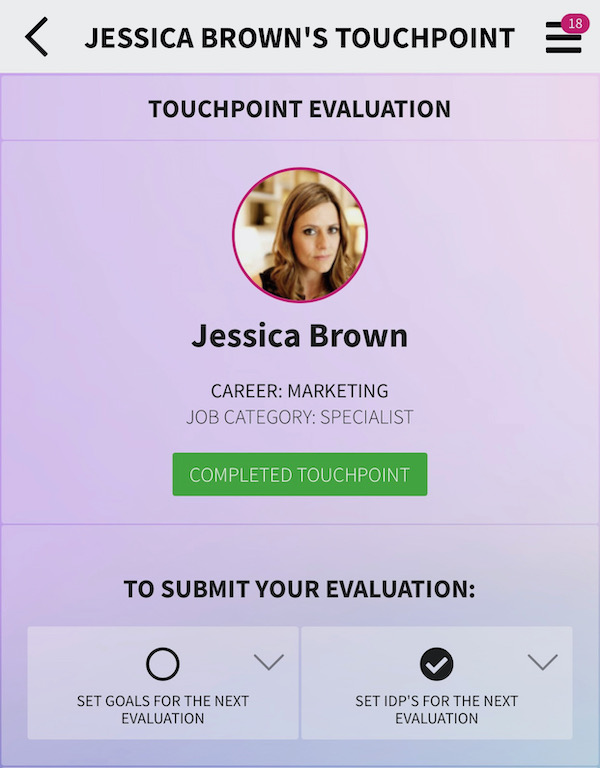
Touchpoints: goals, development plans and feedback throughout the year.
Potential and careers
Understand the present.
Prepare for the next opportunities.
Performance and potential answer different questions. Performance describes the employee’s current contribution; potential adds the manager’s view of their capacity to grow within the organisation.
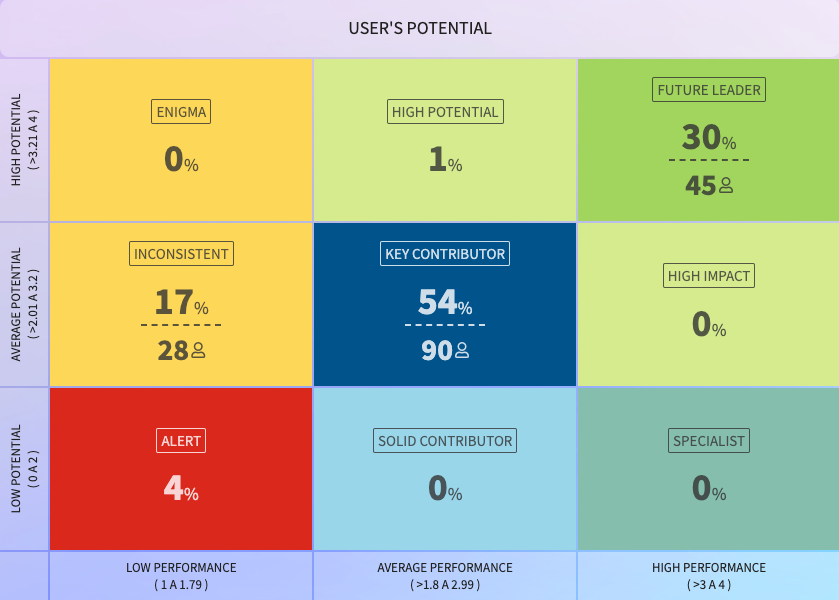
Nine-box performance and potential matrix; screenshot values are illustrative.
A combined perspective.
The matrix brings performance and potential together to help visualise the position of teams. The managers responsible for each team provide the context needed to interpret that distribution.
Development, careers and succession.
Reviewing potential helps identify people to develop and possible successors for particular roles. Career plans can then be discussed with clearer goals and development needs.
Development with context
Reviews matter
when they help people develop.
A rating tells only part of the story. Connecting goals, competencies, conversations and potential helps HR and managers understand performance today and prepare for what comes next. GFoundry brings these dimensions into the same process.
Who could grow into a new role?
Potential reviews complement performance reviews and help identify employees with room to grow. This perspective supports career plans and succession planning for important roles.
Where is closer follow-up needed?
Review results and conversations between employees and managers help reveal what is working, where support is needed and how to guide the next development goals.
Where is the risk of leaving higher?
Connecting the likelihood of leaving with the impact on the business helps prioritise follow-up. The risk matrix presents signals for analysis, while interpretation and decisions stay with HR and managers.
Cycle monitoring
Track review cycles
and their results.
The dashboard brings together participation and completion indicators for the different review stages. Identify reviews that have not started, are complete or are waiting for the manager. When reports have been configured for a cycle, you can export them for analysis and follow-up.
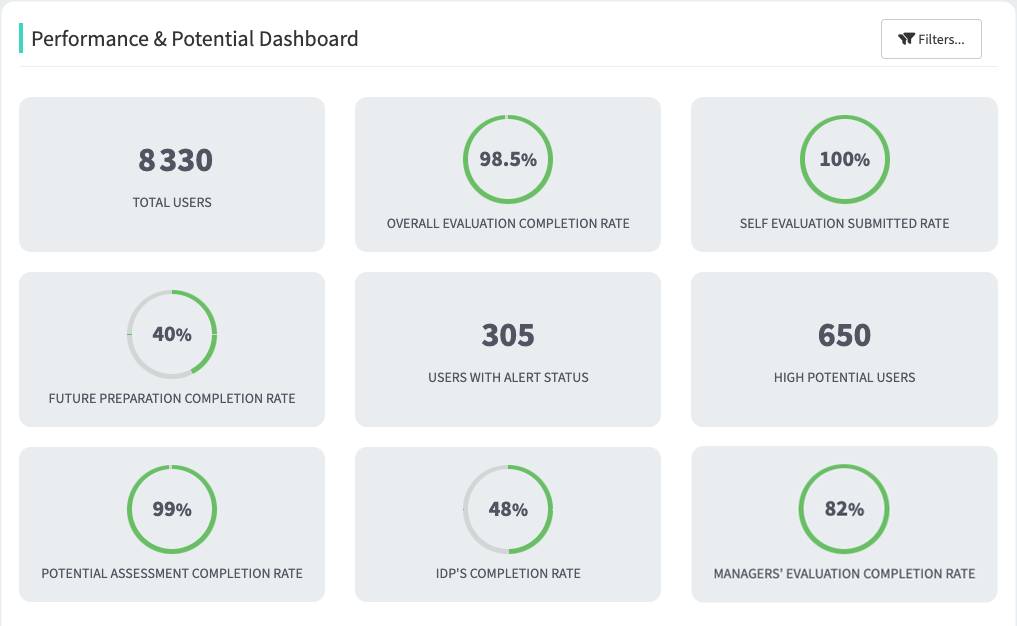
Review cycle monitoring view; screenshot data is illustrative.
Risk of leaving
A matrix to guide
follow-up.
GFoundry combines assessments recorded by HR and managers with automatic estimates based on available signals. The matrix relates the likelihood of leaving to the impact that departure would have on the business.
A high likelihood combined with high impact calls for a different response from a lower-impact situation. Reading the matrix helps prioritise conversations and follow-up without replacing managers’ knowledge of their teams.
To interpret each reading, identify the source of the assessment or estimate, the cycle and the population it covers. These signals do not determine that someone will leave; decisions remain human.
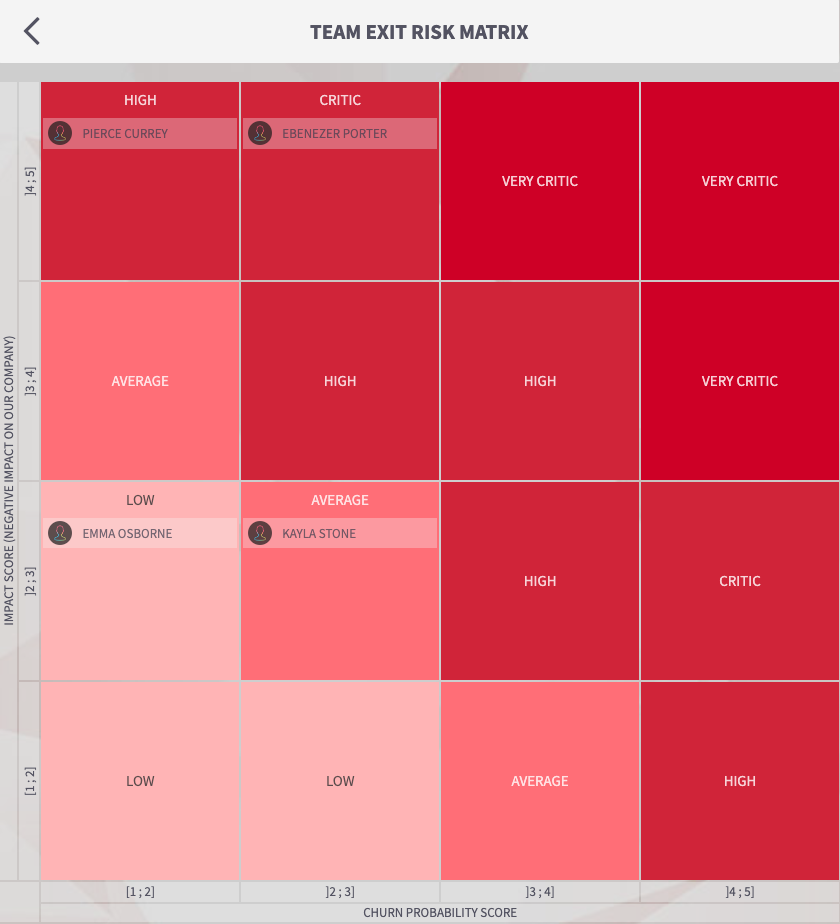
Risk matrix example: likelihood of leaving and business impact.
Intelligence in Premium
From the organisation’s overview
to each person’s context.
People Intelligence, Talent Insights and Talent Strategist offer different ways to explore talent context. They help HR and managers examine the available data in more depth, according to the scope and configuration of the services.
People Intelligence.
Brings together the organisational view to analyse people and talent in a wider context.
Talent Insights.
Brings individual context into the employee’s profile, including mentoring support. Exit risk assessments are excluded from these profiles.
Talent Strategist.
Lets you explore data through natural-language questions, helping you investigate an issue before deciding on the next steps.
Check each insight’s dates, coverage and limitations. These services are part of Premium; availability depends on configuration and the contracted scope.
Preparing implementation
Start with a cycle
that fits your organisation.
Before launching a review, align the criteria, participants and follow-up. These are the areas to prepare when configuring the platform.
Define what to assess.
Organise careers, professional categories, competencies, scales and weights. Establish how goals and competencies contribute to the result.
Prepare the cycle and perspectives.
Define the audience, dates and review model. If the cycle includes 360° reviews, prepare peer contributions from the outset.
Follow up and continue development.
Check review statuses, analyse configured reports and prepare goals and development plans for the next period.
Explore further
The concepts. The application.
Customer experiences.
Explore the review guide and its connection with competency mapping. Customer case studies show how GFoundry fits into different talent management programmes.
Guides, comparisons and competencies.
Performance evaluation guide
Competency mapping
Compare performance management platforms
Customer experiences.
Frequently asked questions
Reviews and development.
Your questions, answered.
Does the software support self-assessment and 360° reviews?
Yes. You can combine self-assessment, manager reviews, goals and competencies. In a 360° review cycle, peers contribute competency ratings with a weight defined in the cycle. You can also configure Feedback 360 cycles focused on competencies from a defined set.
How do we maintain follow-up between reviews?
Through Touchpoint periods throughout the year. During these periods, employees can revisit goals and individual development plans and complete a form to guide their conversation with the manager. Touchpoint activation and scheduling are prepared with the GFoundry team.
Is a potential review the same as a performance review?
No. Performance helps explain the employee’s current contribution; potential adds the manager’s perspective on their growth within the organisation. The matrix brings both dimensions together and supports development, career and succession conversations.
Does the risk matrix predict that someone will leave?
It does not determine that a person will leave. It connects risk assessments and estimates based on available signals with business impact, helping HR and managers prioritise follow-up. Each reading should be interpreted in terms of its source, cycle and population.
How much does the software cost and which plan includes it?
Performance and potential evaluation are available exclusively in the Premium plan, which also includes People Intelligence, Talent Insights and Talent Strategist. Under Enterprise licensing, the subscription is calculated per licensed user per month, billed annually, with a one-off implementation fee. Request a proposal suited to your user numbers, configuration and service needs.
Can we adapt the review criteria and weights?
Yes. You can define scales for goals and competencies, weights and criteria associated with careers and professional categories. When preparing the cycle, you also define the relative weight of goals and competencies and, where applicable, peer contributions.
Can we track statuses and export review reports?
Yes. The cycle page shows employees grouped by review status, including those who have not started or are waiting for their manager. Export is available when reports have been configured for that cycle or Touchpoint period.
Performance evaluation demo
See the review cycle
applied to your organisation.
Tell us which models you use, who takes part and what you want to improve. In a demo, explore goal and competency reviews, follow-up and the development plans available in Premium.