Competency mapping
Map your competencies.Develop your talent.
Connect learning, practice, recognition and evaluation in one skills view. Identify development priorities and give each person a clearer next step.
A view of your organisation
See the skills you have.
Plan what comes next.
Bring the skills demonstrated across your organisation into view. Use the competency map to identify strengths, spot development needs and focus learning where it can make a difference.
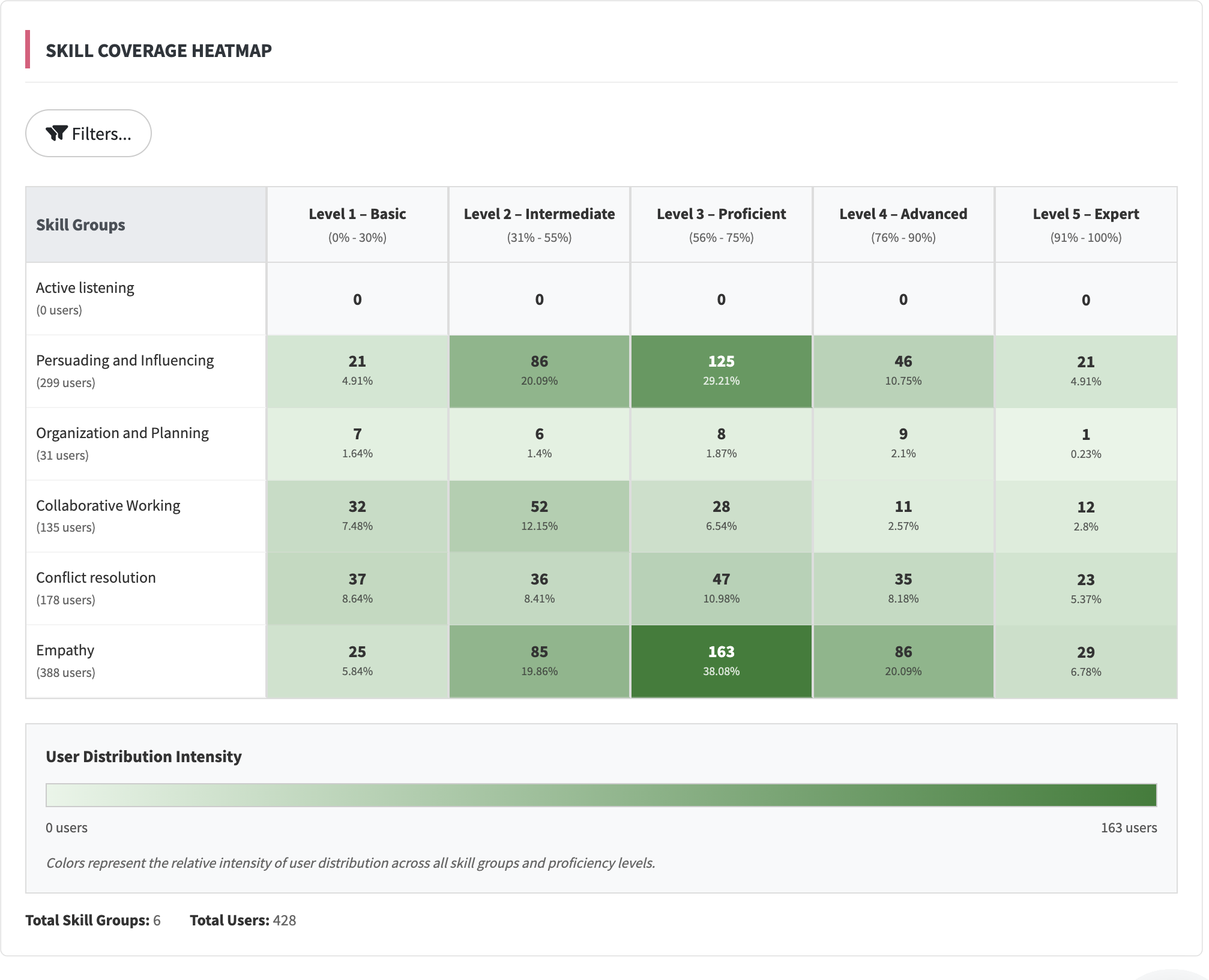
GFoundry skills coverage heatmap. Explore competencies across your organisation.
Connected evidence
One skills profile.
Four sources of information.
Learning activity, conversation practice, peer recognition and evaluation processes contribute different signals to the same skills profile. Together, they give you more context for development conversations.
Learning
Learning connected to skills.
Peer recognition
Skills observed in everyday work.
Evaluation processes
Evidence from different assessments.
Role-plays
Practice with feedback on skills.
The person
Skills they already bring
- Communication
- Collaboration
- Problem solving
Learning
Connect training content to skill tags. Activity on that content contributes information to the employee’s skills profile.
Explore learningConversation practice
Role-play sessions generate feedback against the scenario’s skills and evaluation criteria. See how people apply their knowledge.
Meet Role-Play CoachPeer recognition
Link soft and hard skills to the shared skills catalogue. Recognition from colleagues then contributes to the same competency view.
Explore recognitionEvaluation processes
Bring together competency assessments from the organisation’s different evaluation processes. Each process adds evidence to the profile according to its defined skills and criteria.
Explore evaluationAI applied to development
Turn a skill gap into
a learning opportunity.
Use AI to prepare relevant content and create space to practise. Keep your team involved in defining the objectives and reviewing what is produced.
Learning Designer
Start with a briefing or PDF and develop a structured course. Review the content and skill tags before publication.
Role-Play Coach
Create a conversation scenario with an AI persona. Learners practise and receive feedback on the skills the scenario is designed to develop.
From insight to action
Make the next step in development clear.
A skills map becomes useful when it informs what happens next. Use it to support learning priorities, development conversations and opportunities inside your organisation.
Focus learning
Identify the competencies you want to strengthen and organise relevant content, programmes and practical activities.
Support career conversations
Connect the skills view with evaluation and individual development plans. Agree priorities with the employee and follow their progress.
Explore internal talent
Use competency information to support discussions about internal opportunities and the skills your organisation needs.
Individual development in Premium
Bring the person’s context
into the conversation.
Talent Insights adds individual talent and development context to the profile. In mentoring programmes, it can support automatic pair suggestions, which HR reviews and approves.
Before you start
Your questions, answered.
Where does the competency information come from?
The shared skills engine brings together learning activity, role-play evidence, recognition and skill ratings from the different configured evaluation processes. The information available depends on the features and programmes enabled in your organisation.
Does completing a course prove proficiency?
Course activity is one source of information. Practice, recognition and evaluation add different perspectives. Use the combined view to support a development conversation, rather than treating every completed course as a proficiency assessment.
How does AI help with development?
Learning Designer helps prepare structured courses from a briefing or document. Role-Play Coach supports conversation practice and feedback. Your team defines the objectives and reviews the content.
Which plan should we choose?
Compare the current plans against the learning, evaluation and development processes you want to launch. Mentoring projects using Talent Insights require Premium.